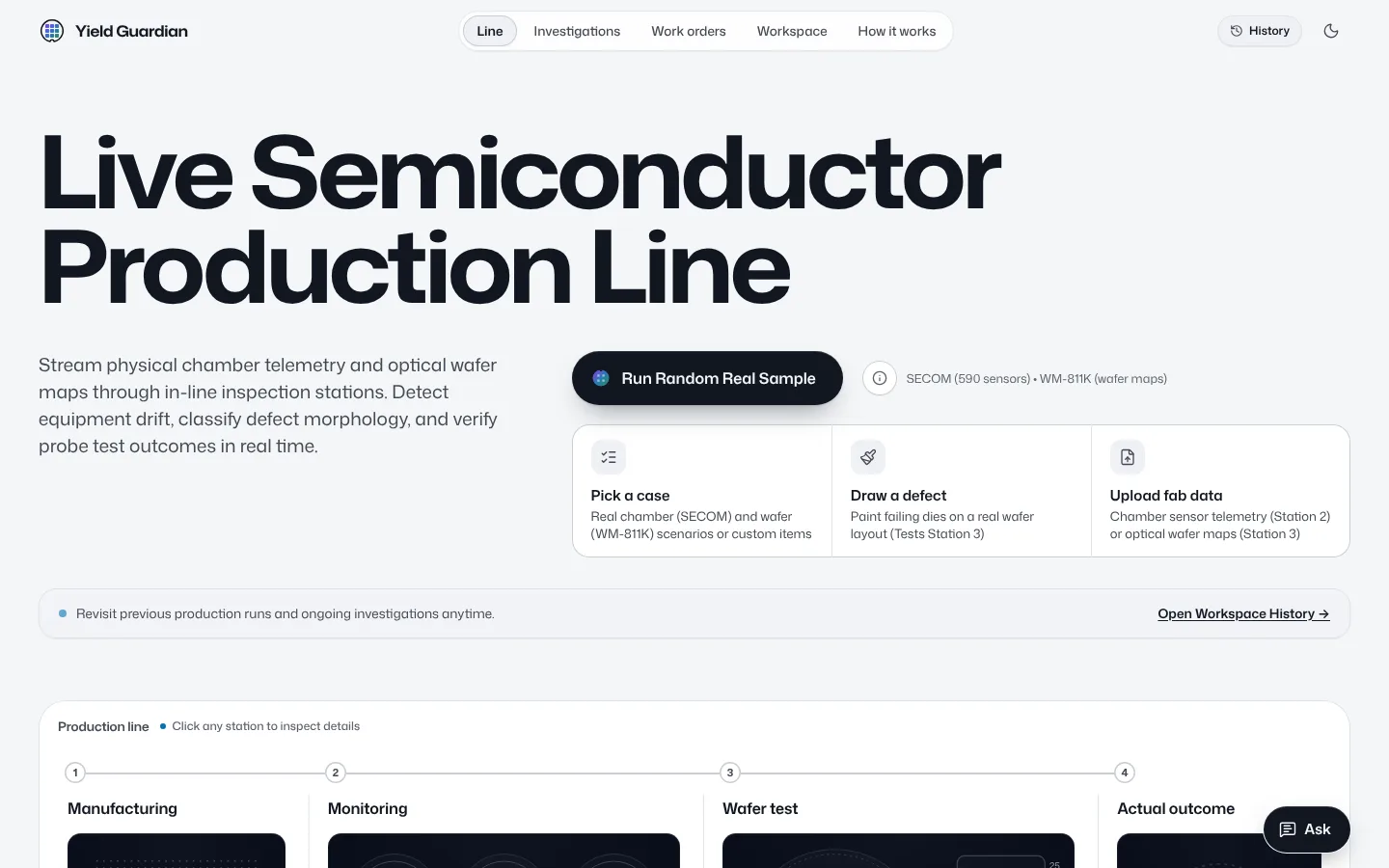
Software for quality and yield engineers in silicon wafer fabs: it helps them spot a problem early and narrow down where to look.
What it does
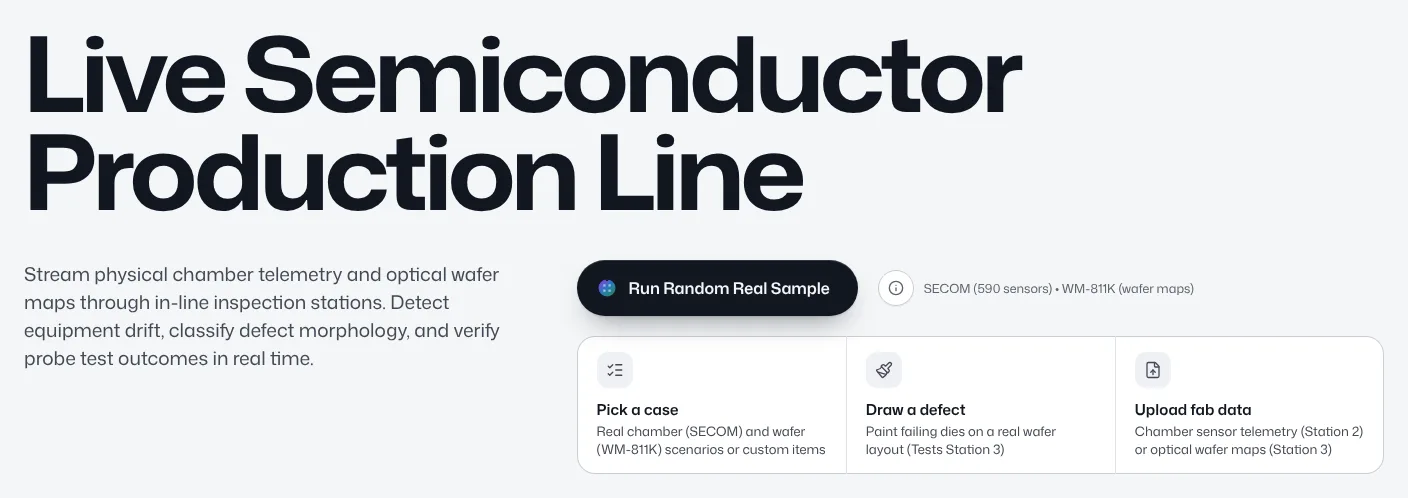
Four ways in.A real sample, a case you pick, a defect you draw on a wafer, or a file from your fab.
Computed live.Your input runs down a five-station line and each result is computed as it arrives. Nothing recorded is replayed.
Investigation on request.On an alarm, the investigator gathers evidence with tools that compute every number and writes a report that links each number to its evidence.
The engineer decides.Approving opens a work order; rejecting keeps the report on file. Language models write and explain; the numbers come from the tools.
1ManufacturingReads and checks your input: counts, missing readings and time order.
2MonitoringWatches each unit's sensors: risk score, control charts, drift and sensor health.
3Wafer testClassifies the defect pattern on each wafer, finds the most similar real wafers and tests the lot.
4InvestigationOn an alarm, if you ask, the investigator gathers the evidence and writes a report.
5DecisionThe engineer approves and a work order opens, or rejects. Nothing happens without approval.
Two kinds of input
Everything the line reads is one of two kinds, each with its own data, models and file layout. The two run side by side on the line and are never joined, because they come from different fabs. You can bring either one or both.
Sensor units
A unit is one product as it passes through the process, with up to 590 sensor readings taken along the way and the time it was made.
What it tells you.The risk that the unit fails its final test, which sensors drifted or went out of their control limits, and which sensors look unhealthy.
Trained on.SECOM, real units from a semiconductor fab.
Your file.One row per unit: unit_id, timestamp, S001 to S590, and the result (pass or fail) if you have it.
Wafer maps
A wafer map is the test result of every die on one wafer, good or failed, laid out in its place on the wafer. The shape the failed dies make points to the cause.
What it tells you.The defect pattern, such as an edge ring, a scratch or a centre cluster, whether the pattern is one the model has not seen, the most similar real wafers, and patterns that repeat across a lot.
Trained on.WM-811K, real wafer maps from real fabs.
Your file.One row per die: lot, wafer, x, y and the result (pass or fail). You can also draw a defect on a wafer yourself.
Where the data comes from
SECOM: sensors
Real production units from a semiconductor fab, each with anonymous sensor readings, its final test result (pass or fail) and its production time.
WM-811K: wafer maps
Real wafer maps from real fabs: each die is good or failed, and part of the maps carry an engineer's defect pattern, such as an edge ring or a scratch.
Your own data
A file from your fab (Excel or CSV) or a drawing, processed by the same code as the samples. Runs are kept for a while, then deleted unless an investigation uses them.
Both sources are public; their origin, licence and file checksums are under For experts. No data is synthetic: every number is computed now from your input or measured on real data the model did not see in training.
For experts
Every number below is read from the API, which reads the model bundles: none is typed into this page. Each result comes with its confidence interval and the data it was measured on. Findings are associations in historical data, not causes.
Measured results
The headline numbers. A row reads “Not measured yet” until it has been measured on held-out data.
Measured results
Quantity
Value
Measured on
SECOM failure-risk PR-AUC, LightGBM
0.08 95% CI 0.05–0.18 (n = 313)
SECOM test block, held out and used onceartifacts/secom/v1/metrics.json
SECOM PR-AUC of a no-skill score (the failure rate)
0.05 95% CI 0.05–0.05 (n = 313)
SECOM test block, held out and used onceartifacts/secom/v1/metrics.json
SECOM PR-AUC, logistic regression baseline
0.17 95% CI 0.10–0.38 (n = 313)
SECOM test block, held out and used onceartifacts/secom/v1/metrics.json
Failures caught at the 5% false-alarm rate threshold
5.9% 95% CI 0–18% (n = 313)
SECOM test block, held out and used onceartifacts/secom/v1/operating_points.json
False alarms per 100 units at that threshold
1.9 95% CI 0.6–3.5 (n = 313)
SECOM test block, held out and used onceartifacts/secom/v1/operating_points.json
T² false-alarm rate on held-out in-control units (99% limit)
WM-811K lot-grouped test mapsartifacts/wafermap/v1/metrics.json
Wafer maps classified automatically at 99% precision
96% 95% CI 96–96% (n = 25954)
WM-811K lot-grouped test splitartifacts/wafermap/v1/metrics.json
Updated .
Models
The trained models, as their model cards describe them, and the language-model roles that write and explain: Claude Haiku 5.5 (Anthropic) on every role but document reading (OCR). The evaluations listed under them are earlier measurements of candidate models.
Model cardsWritten by each training pipeline with its bundle: data, method, results and limits.
AI roles
Language-model roles
The model behind each job: Claude Haiku 5.5 (Anthropic) on every role but document reading (OCR). The verifier role is kept but no longer called: reports are written in one pass.
Role assignments
Role
Model
Effort
Fallbacks
Evaluated success
Changed
InvestigatorPlans the investigation and calls the data tools
claude-haiku-5-5
default
None
Not evaluated
by visitor
WriterDrafts the report from the evidence
claude-haiku-5-5
default
None
Not evaluated
by visitor
VerifierNot called: reports are written in one pass, without a check
claude-haiku-5-5
default
None
Not evaluated
by visitor
ChatAnswers engineers' questions that need a model
claude-haiku-5-5
default
None
Not evaluated
by visitor
RouterDecides whether a question can be answered by rules
claude-haiku-5-5
default
None
Not evaluated
by visitor
Document reading (OCR)Reads documents
MinerU2.5-Pro
default
None
Not evaluated
by visitor
VisionReads images
claude-haiku-5-5
default
None
Not evaluated
by visitor
Earlier evaluations
Historical: candidate models measured on each role's task set before the roles moved to Claude Haiku 5.5, with success rate and its interval, contract violations, median latency and Token Factory points. A model in use is marked Assigned; the others are no longer used.
Not measured yet
No evaluation has been run. Measured by the evaluation harness on fixed task sets; each result names its task set, the number of tasks and a 95% confidence interval for the success rate.
Methods
How each number was measured: the splits, the baselines, the intervals and the operating points. Each track opens in place.
SECOM: control charts and failure riskTime-ordered splits, the risk models against their baselines, calibration, operating points and the control-chart limits.Wafer maps: patterns, unknown patterns and similar wafersThe pattern classifier on the official and lot-grouped splits, the unknown-pattern check and similar-wafer retrieval.
Data and licences
The datasets with their sources, licences and checksums, and the bundles the API loaded.
SECOM
Production units of a semiconductor fab, each with 590 anonymous sensor readings, a pass or fail result from final test and a timestamp.
Citation
McCann, M. and Johnston, A. (2008). SECOM [Dataset]. UCI Machine Learning Repository. https://doi.org/10.24432/C54305
Creative Commons Attribution 4.0 International (CC BY 4.0). Text on the dataset page, retrieved 2026-10-14: "This dataset is licensed under a Creative Commons Attribution 4.0 International (CC BY 4.0) license. This allows for the sharing and adaptation of the datasets for any purpose, provided that the appropriate credit is given."
Wafer maps from real fabs (pass or fail per die), about a fifth of them labelled with one of nine defect patterns.
Citation
Wu, M.-J., Jang, J.-S. R. and Chen, J.-L. (2015). Wafer map failure pattern recognition and similarity ranking for large-scale data sets. IEEE Transactions on Semiconductor Manufacturing, 28(1), 1-12.
Kaggle mirror qingyi/wm811k-wafer-map (dataset id 14180) lists the licence CC0-1.0 in its metadata (retrieved 2026-10-14). That licence was set by the Kaggle uploader, not by the original authors (MIR Lab); the original release states no licence we could retrieve (http://mirlab.org/dataSet/public/ returned HTTP 404 on 2026-10-14). We therefore treat it as a research dataset: raw data is never redistributed, only a small derived demo subset with attribution.
Every file is checked against the SHA-256 in its MANIFEST.json when the API loads it.
Artifact bundles
Bundle
Built
Commit
Files
Checksums
secom v1
21d77afb06
13
Verified
wafermap v1
58516138c0
11
Verified
Savings calculator
What the product would change for your fab, from your own numbers and the measured rates above. Nothing is filled in for you.
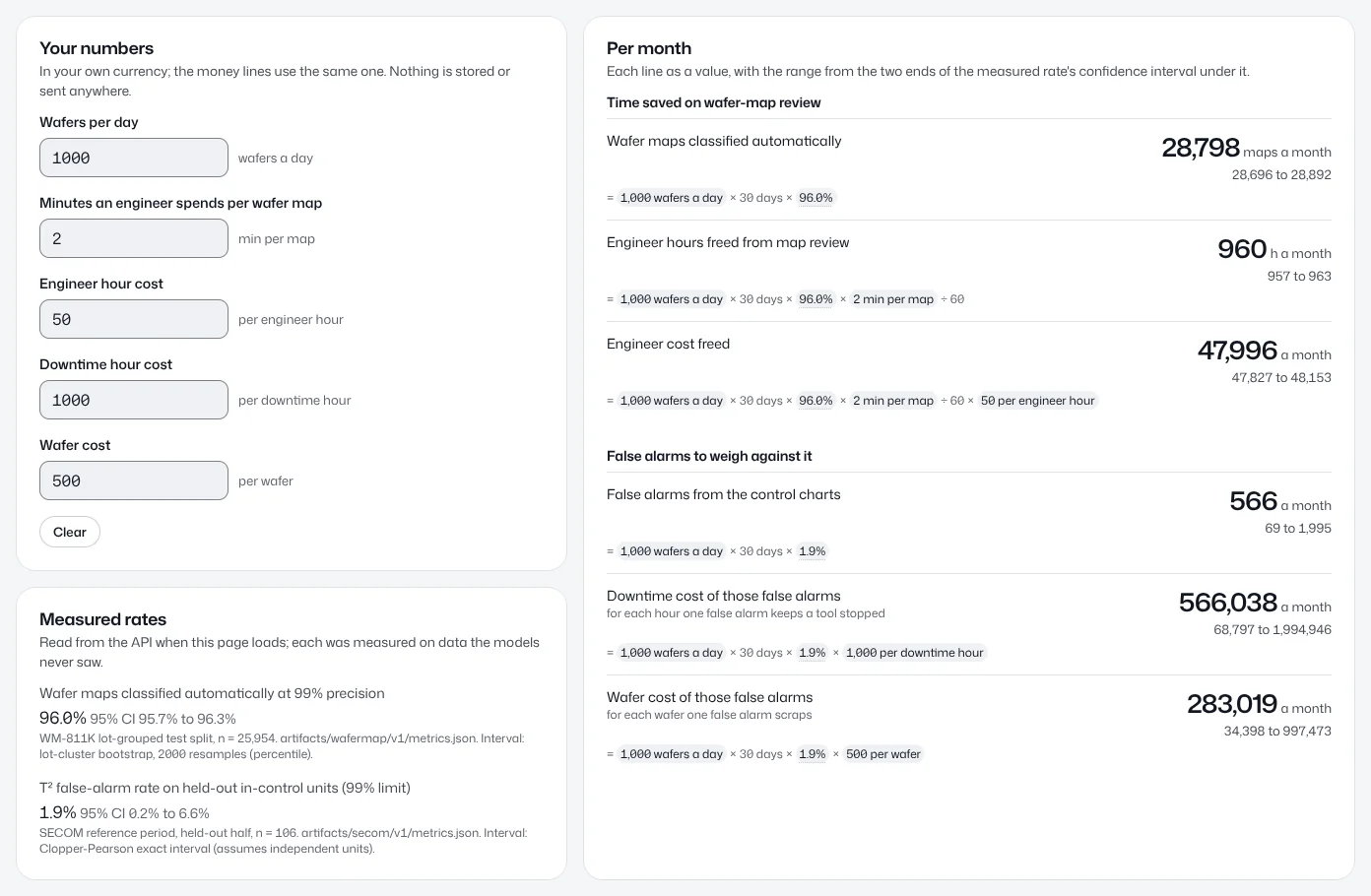
Your numbers
In your own currency; the money lines use the same one. Nothing is stored or sent anywhere.
Measured rates
Read from the API when this page loads; each was measured on data the models never saw.
Wafer maps classified automatically at 99% precision
96.0% 95% CI 95.7% to 96.3%WM-811K lot-grouped test split, n = 25,954. artifacts/wafermap/v1/metrics.json. Interval: lot-cluster bootstrap, 2000 resamples (percentile).
T² false-alarm rate on held-out in-control units (99% limit)
1.9% 95% CI 0.2% to 6.6%SECOM reference period, held-out half, n = 106. artifacts/secom/v1/metrics.json. Interval: Clopper-Pearson exact interval (assumes independent units).
Per month
Each line as a value, with the range from the two ends of the measured rate's confidence interval under it.
Nothing to compute yet
Type your fab’s numbers on the left. Nothing is filled in for you, and a line shows a result only when the numbers it needs are in.
Time saved on wafer-map review
Wafer maps classified automatically
Needs wafers per day
Formula: wafers a day × 30 days × 96.0%= wafers a day×30 days×96.0%
Engineer hours freed from map review
Needs wafers per day, minutes an engineer spends per wafer map
Formula: wafers a day × 30 days × 96.0% × min per map ÷ 60= wafers a day×30 days×96.0%×min per map÷ 60
Engineer cost freed
Needs wafers per day, minutes an engineer spends per wafer map, engineer hour cost
Formula: wafers a day × 30 days × 96.0% × min per map ÷ 60 × cost per engineer hour= wafers a day×30 days×96.0%×min per map÷ 60×cost per engineer hour
False alarms to weigh against it
False alarms from the control charts
Needs wafers per day
Formula: wafers a day × 30 days × 1.9%= wafers a day×30 days×1.9%
Downtime cost of those false alarms
for each hour one false alarm keeps a tool stopped
Needs wafers per day, downtime hour cost
Formula: wafers a day × 30 days × 1.9% × cost per downtime hour= wafers a day×30 days×1.9%×cost per downtime hour
Wafer cost of those false alarms
for each wafer one false alarm scraps
Needs wafers per day, wafer cost
Formula: wafers a day × 30 days × 1.9% × cost per wafer= wafers a day×30 days×1.9%×cost per wafer
Assumptions
A month is 30 days of production at the wafers per day you typed.
Today an engineer looks at every wafer map for the minutes you typed. With the classifier, maps classified automatically at the 99% precision target need no review; the rest, and every map flagged as an unknown pattern, still do.
The share classified automatically was measured on held-out WM-811K lots. On another fab’s wafers it can be lower until the classifier is retrained, as the limits above say.
Each wafer passes the control charts once, as a SECOM unit does, and the line runs in control: an alarm on a wafer that really drifted is not a false alarm, so this counts the false alarms of a healthy line.
The false-alarm rate was measured on 106 held-out in-control SECOM units, so its interval is wide and the false-alarm lines spread widely.
What a false alarm costs depends on what your fab does with one. The downtime and wafer lines give the cost for each hour of stop and for each wafer scrapped per false alarm: multiply by your own figure. The time an engineer spends checking an alarm is not counted.
Wafers saved and downtime avoided by an earlier warning are not computed: neither dataset records when a problem would have been found without the product, so there is no measured rate for them.
Ranges come from the two ends of the measured rates’ confidence intervals (95% CI), computed with the unrounded rates. Your own numbers are taken as exact.
Money is rounded to whole units of your currency; hours and counts to whole numbers, with one decimal below 10.
User guide
The product step by step: pages, ways to start, stations, alarms, investigation, approval, chat and the calculator. Measured numbers are in the expert sections above.
The pages
Five pages in the top bar, and a chat button.
Line, Investigations, Work orders, Workspace and How it works
«Line»: give the production line an input and watch each station's result as it is computed.
«Investigations»: investigations running, awaiting a decision and decided.
«Work orders»: every work order opened by an approved report, with the audit log.
«Workspace»: the runs kept on this device, to reopen, rename, compare, run again, download, archive or delete.
«How it works»: this page, with the plain introduction, «For experts» and this guide.
«History» in the top bar opens the same runs in a side panel; the theme button switches light and dark.
The floating «Ask» button at the bottom of every page opens the chat.
On a phone the pages sit behind the menu button.
The top bar with its five pages, and the Ask button at the bottom
Old addresses
Every version 1 address still works and redirects to its new place, so saved links keep working.
/wafers, /lots and /sensors open the matching station on «Line»; /units/…, /wafers/… and /lots/… open that item there.
/work-orders/… opens that work order under the report of the investigation that opened it, or on «Work orders» when the investigation cannot be looked up.
/models, /methods and /guide open their sections of «How it works».
The language-model role settings live on a hidden admin page: anyone can read it, only the admin changes roles.
Workspace
Every run you start is kept in this device's workspace with its live status.
Each run's menu opens it on the line, investigates its alarms, renames it, runs the same input again, compares it with another run, downloads its results or report, archives it or deletes it.
Deleting the run that is open on the line, or starting a fresh workspace, clears the line at once.
«Continue on another device» gives a code; «Join another workspace with a code» uses one.
When to sign in
No sign-in is needed: the first visit opens a session and a workspace for this device.
«Investigate» and «Ask» start an engineer guest session on their own when there is none, so you can investigate, approve or reject, update a work order and chat.
Changing the model behind a role needs the admin account.
Four ways to start
Nothing moves on the line until you give it input.
The four buttons
«Run Random Real Sample»: one click; the server draws, with a recorded seed, real SECOM test units the risk model never saw and real WM-811K wafer maps. The rule and seed are shown with the run.
«Pick a case»: choose a real case from the list, or browse the real units and wafers yourself.
«Draw a defect»: paint failing dies on a real WM-811K wafer layout.
«Upload fab data»: a CSV or Excel (.xlsx) file from your fab, checked before it runs.
Every input goes through the same code, so a sample is processed exactly like your file.
The input bar with its four buttons on the idle Line page
Pick a case
Real situations from the data: a unit that raised an SPE alarm, a slow drift, a scratched wafer, an unknown pattern, a lot with a repeating pattern.
Each case is a real item found by the rule written beside it, not a made-up example.
Draw a defect
Pick a die layout: each is the die arrangement of a real WM-811K wafer.
All dies start as pass; paint the ones you want as failing.
Add more wafers to get a lot test, then run: your drawing goes through the same model as real wafers.
A shape unlike the maps the model learned from keeps its nearest pattern, with a prompt to check it by eye.
Upload fab data
Upload a sensor file, a wafer file, or one of each to run both streams together.
The server checks the file before any run; an error names the row and the problem, and the run waits until you fix it.
Download an empty template (headers only) or a real example file in the same format, as CSV or Excel.
File
One row is
Columns
Sensors
one production unit
unit_id, timestamp, S001 … S590, result
Wafers
one die
lot, wafer, x, y, result
Sensors: the S columns are the SECOM sensors in order; an empty cell is a missing reading; result is optional (pass or fail).
Timestamps are ISO 8601 without a time zone (YYYY-MM-DDTHH:MM:SS); a space instead of T and Excel date cells also work.
Several units in time order enable drift detection (EWMA and CUSUM) and the sensor health check.
Wafers: x is the column and y the row, counted from 0 at the top left; a position not listed has no die. Several wafers of one lot enable the lot test.
The five stations
What each station computes, and what its states mean.
The stations in order
① «Manufacturing» reads and checks the input: counts, missing readings, unmonitored sensors, time order, and whether the run mixes two sources.
② «Monitoring», for units: failure risk with its measured skill, the most influential sensors (SHAP), T² and SPE control charts with contributing sensors, EWMA and CUSUM drift, and sensor health.
③ «Wafer test», for wafers: defect pattern and confidence, classified automatically or «for review», failure clustering, the most similar real wafers and causes named in the literature; for two or more wafers of a lot, whether a pattern repeats beyond chance, with the stacked map.
«Actual outcome»: the recorded real results (the result column, or wafer labels) compared with our predictions, per unit and per wafer.
④ «Investigation» and ⑤ «Decision» start on request, from an alarm.
Each result appears in its station the moment it is computed.
SECOM sensors and WM-811K wafer maps are separate real sources; when both run together a bar says so.
Station states
«Bypassed»: the station needs an input you have not given, such as wafers for «Wafer test»; a line says what is missing.
«Computing»: computing now, with the real elapsed time.
«Done»: finished, no alarm. «Alarm»: an alarm was raised. «Stopped»: the station could not finish.
Under each station, one sentence and one number sum up its result.
Station details and results
Click a station tile to inspect it: the station stays on the left with its diagnostics and its details open beside it. Tabs switch station, and «Back to full pipeline» returns to the whole line.
Units: risk with its skill, SHAP bars, sensor groups, T² and SPE with their limits and contributing sensors, EWMA and CUSUM, and the sensor health table.
Wafer: the map, pattern probabilities, the unknown and energy scores, the clustering test, similar wafers, and causes from the literature with their sources.
Lot: the stacked map and the tests.
The result section under the line has the tabs «Predicted problems», «In-Line Alarms», «Failure predictions vs outcome» and «Pattern predictions vs outcome».
Pattern names: WM-811K's «none» is shown as «Light scatter» and «Random» as «Heavy scatter».
Alarms
When an alarm is raised, and who raises it.
When an alarm is raised
Alarms are listed in the «In-Line Alarms» tab of the result section, each with a title, a plain meaning, a level (warning or alarm) and an «Investigate» button.
Code raises every alarm with a fixed rule and writes its meaning; AI never raises an alarm.
Type
Raised when
risk
The unit's failure risk reaches the operating threshold.
t2
T² is above its limit: the unit is far from normal.
spe
SPE is above its limit: the usual relation between sensors broke.
ewma
A small, steady drift across consecutive units.
cusum
A slow drift building up across consecutive units.
wafer_pattern
The model classified the wafer with a defect pattern.
unknown_pattern
The wafer is unlike the training maps: check it by eye.
lot_excursion
A pattern repeats in the lot more than chance explains.
Investigation
What happens when you press Investigate, and how to read the report.
Press Investigate
Press «Investigate» on any alarm; it starts an engineer guest session first if you have none.
The investigator starts at once; the alarm then shows its status and «Open investigation».
The investigation page opens on the «Agent Run» tab of the right panel (tabs «Evidence», «Agent Run» and «Trace»): each tool the investigator called and how long it took, as it happens.
While it runs, the left side shows the current step and the time so far in place of the report.
The writer model writes the report once, in a single pass, and the investigation moves to «Awaiting decision».
By default every language-model role but document reading runs on Claude Haiku (Anthropic), named with its version under «For experts». The time shown is the real elapsed time.
Reading the report
The summary, findings and proposed actions are written by a language model, so they appear in a serif font.
The report is not checked by a second model or by code: check its evidence links yourself before you approve.
Numbers link to their evidence (such as E3): click one to see where it came from.
The wording is «associated with», not «caused by»: the data is historical.
The hypotheses table
Column
Meaning
Hypothesis
A possible cause, often from the causes named in the literature.
Sources
The papers that name it.
Evidence for
Evidence from the run that supports it.
Evidence against
Evidence from the run that goes against it.
Assessment
supported, not supported or inconclusive.
Wafers: evidence comes from pattern confidence, the unknown score, similar wafers and their labels, repetition in the lot, clustering and the stacked map.
Units: which sensor groups drifted, by how much and since when.
«supported» means the run's evidence agrees with it; an engineer confirms the cause.
The investigations list
«Running»: investigations in progress, with elapsed time.
«Awaiting decision»: a report ready for an engineer.
«Decided»: reports an engineer approved or rejected.
Failed recording attempts are kept behind a button at the bottom of the list.
Approval and work orders
The engineer's decision, the work order and the confirmed cause.
Approve or Reject
Read the report and check its evidence.
Select the actions you agree with and press «Approve»: a work order opens with them, and a card says «Approved · Work order WO-… opened» with «Open work order».
Or press «Reject report»: the report stays on file, marked rejected, and the card says «Rejected · no work order» with «Back to the line».
The recorded example investigation every visitor sees cannot be decided.
Nothing happens in the fab without a person's approval.
Work orders
«Work orders» in the top bar lists every order, newest first, with the audit log beside it: who did what, and when.
Change an order's status straight from the list with its status menu, or delete it with its «×» (its investigation and report stay). The example order can be neither changed nor deleted.
Each order is also shown under the report of the investigation that opened it.
Its «Update» form sets the status (Open, In progress, Done or Cancelled), a note and the outcome, with «I confirm this outcome»; every change goes to the audit log with your name.
Confirmed cause
When setting a work order to Done, the engineer can record the cause actually found and the hypothesis it confirms.
It shows on the work order as the fab's own record, collected for the fab to learn from later. Reopening the order withdraws it.
Chat
The Ask button on every page.
The Ask button
«Ask» floats at the bottom of every page and is reachable with Tab.
It always reads what is visible on the page: the run, station and item on «Line», or the open investigation.
Type and press Enter or the arrow button, or pick a suggested question. Write in English or Arabic: each message takes its direction from its own text.
Attach a Markdown (.md) or text file to ask about it, and export the conversation as Markdown.
It explains results, answers «why», cites causes from the literature, compares with similar wafers, summarises the run and helps with uploads.
It may suggest an investigation; you press the button.
Savings calculator
Hours and money saved for your fab, from your own numbers.
Using the calculator
Open «Savings calculator» under «For experts» and enter your fab's numbers: «Wafers per day», engineer minutes per wafer map, «Engineer hour cost», «Downtime hour cost» and «Wafer cost». All fields start empty.
Each line appears once its inputs are filled: a value, and below it a range from the measured rate's confidence interval.
The two measured rates come from the API: the share of wafer maps auto-classified at a 99% precision target, and the control charts' false alarm rate.
Savings are the engineer hours not spent reviewing auto-classified maps, and their cost; false alarms are counted alongside, priced per downtime hour and per scrapped wafer.
Every assumption is written under the calculator, and each line shows its formula.
The calculator with rounded example numbers typed in, as you would type your fab's: 1000 wafers a day, 2 minutes a map, 50 per engineer hour, 1000 per downtime hour and 500 per wafer. These are a reader's example inputs; only the two measured rates come from the API.
Glossary
The technical words, in plain language.
Short glossary
Term
Meaning
Unit
One SECOM product, with its sensor readings and its recorded test result.
Wafer
The silicon disc the dies are made on.
Die
A small square on the wafer; on the map it is pass or fail.
Lot
A group of wafers made together.
T²
How far a unit is from normal, along the directions sensors usually move together.
SPE
How much the usual relation between sensors broke: what the normal model cannot explain.
EWMA and CUSUM
Drift detectors across consecutive units: small steady drift, and slow cumulative drift.
SHAP
How much each sensor contributed to this unit's risk score.
CI
Confidence interval: the range the true value most likely falls in. Every measured number has one.
ROC-AUC and PR-AUC
How well the model ranks failing units ahead of good ones.
Macro-F1
The average F1 over all patterns, each weighted equally; F1 combines precision and recall.
Unknown pattern
A map unlike the training maps; the nearest pattern is shown with a prompt to check by eye.
Work order
A fab task opened when an engineer approves a report's actions.